Every prompt in this pack, complete and copyable from this page. Open any one for the real before/after and the step-by-step.
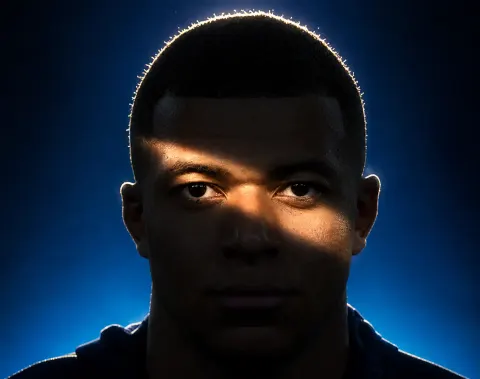
Use the first image as the base image. Preserve the exact facial structure, features, proportions, expression, gaze, pose, camera distance, framing, hairstyle, and clothing with zero alterations. Do not reshape or reinterpret the subject in any way. Completely relight the scene using dramatic low-key cinematic lighting. The face falls mostly into deep shadow, with one defining element: a narrow diagonal band of hard light cutting across the face at the eye level, entering from the upper left and descending toward the lower right, illuminating the left brow, both eyes, the bridge of the nose, and the top of the right cheekbone, like a slash of light across an otherwise darkened face. The edges of this light band are defined but naturally feathered, as if cast through a narrow opening, with realistic falloff. Everything outside the band — forehead, lower cheeks, mouth, jaw, neck, and torso — sinks into near-black shadow while retaining subtle detail in the darks. Eyes remain sharp and luminous inside the lit band, acting as the absolute focal point. Add a hard light source positioned high and behind the subject creating a bright rim of light tracing the outline of the hair, catching individual backlit strands and separating the silhouette from the background with a warm glowing halo that conveys depth. Skin texture stays natural and detailed in the lit areas, no artificial smoothing. Replace the background with a deep blue gradient, brighter toward the lower frame and darkening toward the upper corners, with a subtle atmospheric glow behind the head reinforcing the rim light. Moody chiaroscuro editorial portrait aesthetic, crushed blacks with retained detail, gentle bloom on the brightest highlights, cinematic color grade of cool blue tones contrasted with warm skin highlights.
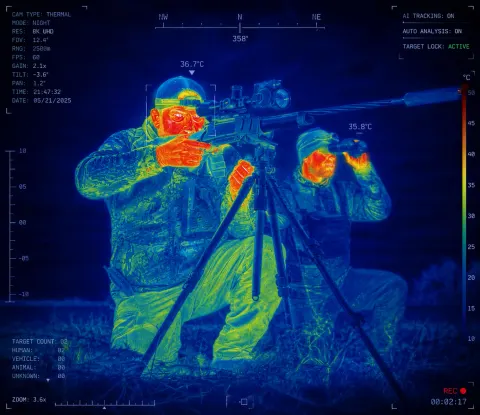
Transform the uploaded image into a highly realistic AI thermal vision surveillance scan while preserving the exact identity, facial features, body proportions, pose, clothing, background, lighting direction, and camera perspective of the original photo. Convert the entire scene into a futuristic military-grade infrared thermal imaging view as if captured through an advanced thermal camera. Render the subjects with realistic heat signatures, using a scientific thermal color spectrum where cooler areas appear deep blue and cyan, medium temperatures appear green and yellow, and warmer areas such as faces, hands, and exposed skin transition into orange, red, and white highlights. Maintain the original clothing shapes and textures but reinterpret them through thermal material detection, showing realistic heat absorption and temperature differences across fabrics. Add subtle AI computer vision analysis elements including face recognition brackets, body tracking markers, temperature readings, thermal scale indicators, digital sensor overlays, scanning lines, grid patterns, small technical HUD text, and futuristic surveillance interface details integrated naturally into the image. The result should look like an authentic screenshot from a next-generation military reconnaissance camera or AI-powered security system, with ultra-detailed infrared rendering, realistic heat distribution, sharp edges, high contrast, subtle sensor noise, infrared bloom, professional VFX quality, 8K detail, and believable thermal camera artifacts. Keep the original composition and framing unchanged, make it photorealistic and technologically advanced, not cartoonish, not fantasy, not stylized.
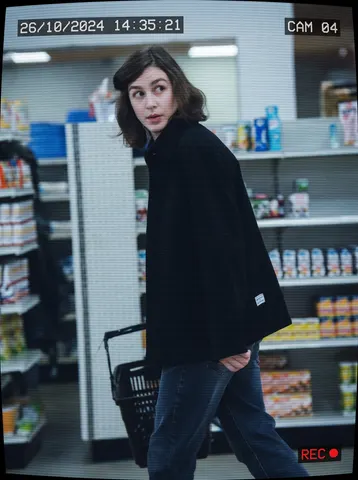
Transform this uploaded photo into a candid CCTV security-camera still. Apply a cool, slightly desaturated surveillance color grade, subtle horizontal scanlines, and a mild fisheye-style lens curvature at the edges of the frame, as if captured from an overhead security camera.

Add authentic graphic overlay chrome in the corners: a small burned-in timestamp (date and time) in the top-left corner, a camera ID label like "CAM 04" in the top-right corner, and a thin red "REC" indicator with a small dot in a corner, all rendered in a blocky monospace font typical of real CCTV systems.

Preserve the subject's identity, pose, and framing from the original photo, keeping the composition readable as a genuine security-camera capture rather than a staged photo. Do not add soft film grain, light leaks, or blur — keep the image graphically sharp so the CCTV overlay elements stay crisp and legible at thumbnail size. No real brand names, camera manufacturer logos, product packaging text, or trademarked UI elements should appear anywhere in the overlay or background.

The final result should look like an authentic pulled CCTV security still, timestamped and labeled, unmistakably surveillance footage of a real moment.
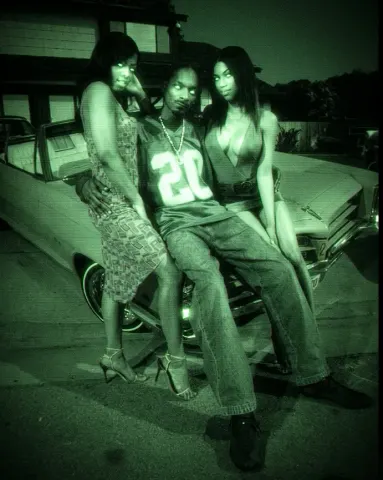
Use the reference image as the base image. Preserve the exact pose, framing, camera distance, facial structure, expression, hair placement, clothing, and accessories with zero alterations. Do not modify the subject's face shape, features, or proportions in any way.
Transform the image into an early-2000s CCD camcorder NightShot infrared capture. Apply a monochromatic green night vision color grade across the entire frame, with deep murky green shadows and bright phosphor-green highlights, with no other hues present.
Simulate infrared illumination coming from the camera position, making skin, eyes, and reflective surfaces glow slightly brighter than the surroundings while the background falls into dark green murk.
Add heavy digital sensor noise and coarse luminance grain typical of low-light CCD sensors, with visible speckling across shadows and midtones. Introduce soft focus and mild bloom on highlights, slight chromatic smearing on bright edges, and gentle vignetting toward the corners.
Use a low dynamic range with crushed blacks and clipped glowing highlights. Add subtle interlacing texture and soft VHS-era digital compression artifacts. Include slight motion softness as if captured handheld on a consumer camcorder at night.
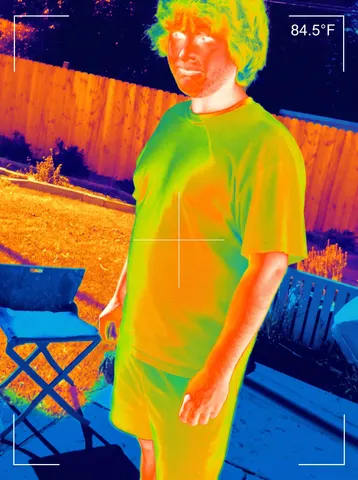
Turn this uploaded photo into an authentic thermal-imaging camera capture, as if viewed live through a handheld thermal scope. Recolor the entire scene using a rainbow thermal heat-map palette: deep blue and purple for the coolest surfaces like sky, shaded fence, and grass, shifting through green and yellow for mid-temperature surfaces, and bright orange to white-hot for the warmest areas, especially exposed skin on the face, neck, and hands.

Preserve this person's exact pose, proportions, composition, and framing from the original photo — only replace the color information with the thermal heat-map palette and add thermal-viewfinder graphic chrome. Keep the image crisp and clean; do not add soft grain, film noise, light leaks, or blur — thermal footage should read sharp and digital, not degraded.

Add authentic thermal-camera HUD elements: a small temperature readout in Fahrenheit in the top-right corner, a thin crosshair reticle centered on the person, and thin white viewfinder corner brackets framing the shot like a real handheld thermal scope display. Do not include any real brand names, logos, or manufacturer markings anywhere in the overlay. The final result should look like an authentic frame captured through a real handheld thermal-imaging camera.
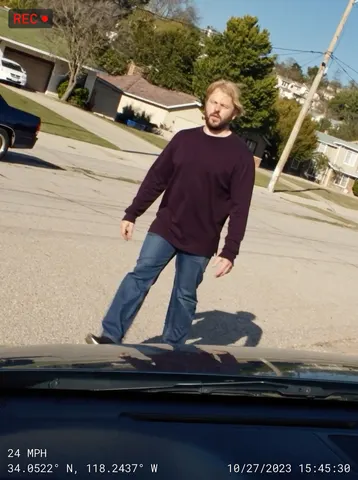
Turn this uploaded photo into an authentic dashcam capture, as if pulled directly from a car's dashboard camera recording this exact moment. Reframe the scene through a slightly wide dashcam lens angle from behind a windshield, with a dark sliver of dashboard and the top edge of a hood visible at the very bottom of the frame.

Preserve this person's identity, outfit, pose, and the scene's composition and lighting exactly as in the original photo — only change the framing and add dashcam graphic overlay elements. Do not add soft grain, film noise, light leaks, vignette, or any blur; keep the image crisp, sharp, and clean like real digital dashcam footage, not degraded or cinematic.

Burn in a dashcam HUD overlay in a small monospace digital font: a speed readout in the bottom-left corner, GPS coordinates in the bottom-left corner beneath the speed, and a date/timestamp in the bottom-right corner. Add a small red circular "REC" indicator with a dot in the top-left corner. Do not include any real brand names, logos, or manufacturer markings anywhere on the dashboard, hood, or overlay. The final result should look like an authentic frame pulled straight from a real dashcam recording.
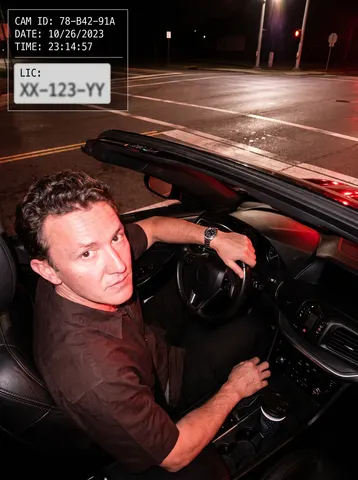
Transform this uploaded photo into a red-light traffic camera capture. Keep the person's identity, face, and outfit exactly as shown in the original photo — do not change their features, clothing, or pose. Remove any phone, phone mount, or personal device from view; show only the driver and the car interior.

Render the scene as if captured mid-flash by a red-light or speed camera mounted above an intersection: add a harsh white flash-lit look with slightly blown highlights and a raised, wide-angle downward camera angle looking through the windshield toward the subject. Overlay a graphic HUD readout in one corner with a simulated date/time stamp, a fake camera ID code, and a blurred-out generic license-plate style rectangle — invent all numbers and text, no real plate numbers, and no real car brand logos, badges, or emblems anywhere on the vehicle or dashboard.

Keep the background context recognizable as a street or intersection setting, with realistic asphalt, road markings, and ambient night lighting. Do not add soft film grain, light leaks, or blur — the imperfection here comes only from the flash exposure and the graphic HUD overlay, not from texture effects. No smoothing or plastic skin; preserve real skin and fabric texture under the flash lighting.

The final result should look like an authentic red-light traffic camera still of this exact person's driving moment, complete with a graphic HUD overlay, harsh flash lighting, and zero real-world branding.
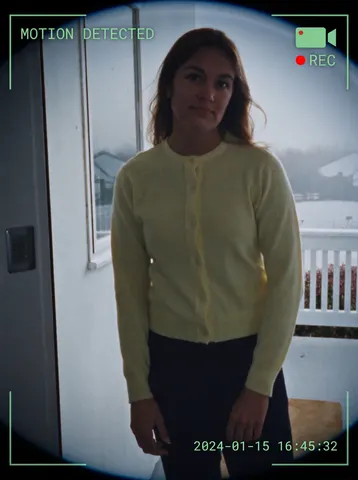
Transform this uploaded photo into a smart doorbell camera capture. Apply a subtle fisheye lens distortion to the edges of the frame, as if seen through a wide-angle doorbell camera lens. Overlay a semi-transparent HUD in the corners: a small plain camera icon with a red dot and the text REC beside it, a plain text banner near the top reading MOTION DETECTED, and a digital timestamp burned into a bottom corner showing a plausible date and time, all rendered in a crisp white or green monospace font like real doorbell camera firmware.

Preserve the subject's face, identity, pose, and the original scene composition and lighting exactly as captured — only add the lens distortion and HUD overlay elements, do not restyle the photo itself. Keep colors true to a slightly cool, slightly low-dynamic-range security camera look without over-processing.

Do not add any real brand names, logos, or app names to the HUD — use only generic icon shapes and plain text labels like MOTION DETECTED and a plain timestamp, with no trademarked doorbell brand wording anywhere on the overlay or in the scene. Avoid adding soft grain, film noise, or light leaks — the unpolished look must come only from the graphic overlay elements themselves, keep the underlying image sharp and clean.

The final result should look like a genuine motion-triggered clip captured by a smart doorbell camera, complete with fisheye framing and an authentic on-screen HUD.
Use my uploaded photo as it is.

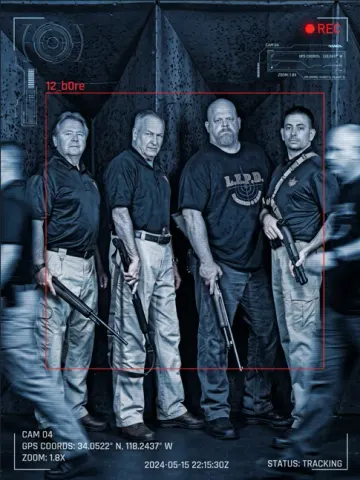
Turn it into a cinematic surveillance / spy- 51 camera scene. Keep my exact face, hairstyle, outfit, body proportions, pose, and background structure recognizable.

Add a realistic blue monochrome CCTV filter with dark shadows, scanlines, film grain, and slight motion blur.

Place a red “12_b0re” tracking box around me with futuristic scanner Ul graphics and surveillance overlays like:

• CAM 04

• REC icon

• Tracking coordinates

• Zoom indicator

• Timestamp

• “STATUS: TRACKING”

Add blurred moving people around me to create a realistic surveillance effect, but keep me sharp and in focus. Maintain realistic lighting, skin texture, shadows, and perspective. Make it look like an actual leaked spy-camera frame from a thriller movie.