Complete prompt text, copyable straight from this page. Open any prompt for the real result and the step-by-step.
## Raw iPhone Selfie Aesthetic Prompt

Raw iPhone selfie aesthetic. Subjects from reference images standing close together, both leaning slightly into frame, casual shoulder-to-shoulder composition, direct gaze into camera with relaxed neutral expressions. Handheld at arm's length with slight upward tilt. Soft indoor lighting mixed with phone flash causing mild overexposure on highlights and shadow falloff. Natural skin texture visible with pores and subtle makeup detail. Stray hairs and fabric creases present. Background loosely visible with everyday environment elements slightly out of focus. Minor motion blur on edges. Slight lens distortion from close proximity. Off-center framing with imperfect crop. Subtle ISO grain and uneven white balance. Unpolished, candid realism.
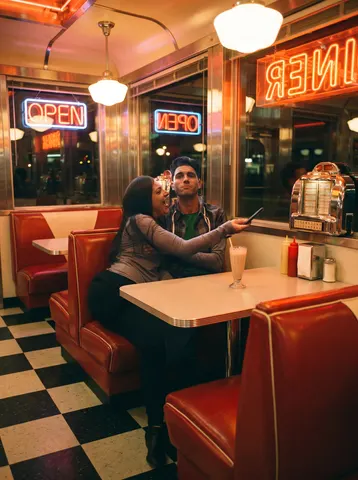
Transform this uploaded photo of the two of you into a retro American diner date scene straight out of the 90s. Reset the background to a checkerboard-floor diner booth with red vinyl seats, a chrome jukebox glow, and warm neon signage bleeding softly into the frame, like a snapshot someone's mom would have taken with a disposable camera.

Keep both faces, expressions, body proportions, and the closeness between the two people exactly as they are in the original photo — do not re-pose anyone, swap outfits into something wildly different, or change who is who. Warm the color temperature toward amber and red, add soft halation around the neon and window light, and lay in a light, even film grain across the whole frame.

Avoid digital smoothing or plastic-looking skin — this should look like real film picked up genuine skin texture and imperfect diner lighting, not a filtered selfie. Keep the framing and camera angle close to the original so it still reads as a real photo of an actual date, not a rendered scene.

The final result should look like a candid Polaroid snapped mid-date at a real diner booth in 1998.
Transform this uploaded couple's photo into a cinematic movie-poster-style still. Preserve both subjects' exact facial identities. Frame them close together — one embracing the other, or foreheads nearly touching — with warm golden-hour backlight rimming their hair, soft film grain, and a shallow depth of field that melts the background out of focus. Add a subtle anamorphic lens flare and a rich warm-to-cool color grade.

The mood should feel like a still pulled from a romantic drama: intimate, cinematic, quietly nostalgic. No text, no logos, no movie titles, no credits anywhere in frame.

The final result should look like a professionally graded film still, the kind that would sit on a poster without a single word on it.
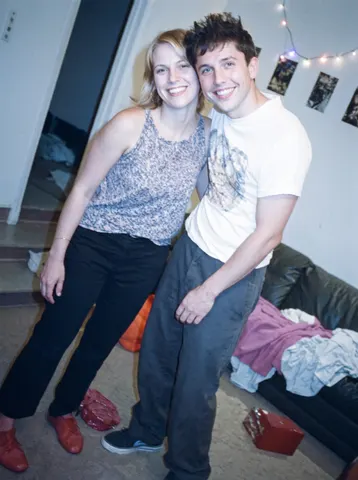
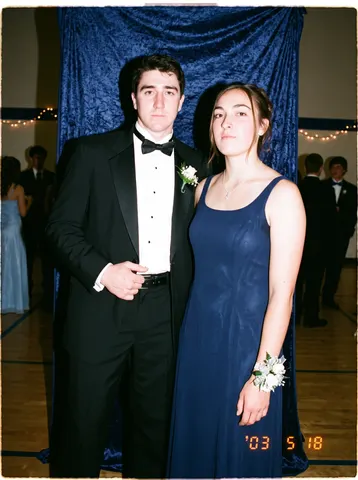
Transform this uploaded photo into a flash-lit prom-night snapshot from the early 2000s, the kind every couple has in a shoebox somewhere. Add the telltale direct on-camera flash look: slightly blown-out skin highlights, a hard black-edged shadow cast on the wall or curtain behind the couple, and a faint warm ambient tone bleeding in from the room lights.

Preserve both people's faces, identities, body positions, and the framing exactly as uploaded — only the lighting, color grading, and photo texture should change. Dress the scene with period-accurate touches like a plain gymnasium or hotel-ballroom backdrop, a corsage or boutonniere if visible, and posture typical of a formal dance photo, without altering who is in the photo or how they are posed.

Keep skin texture real — no smoothing, no plastic skin, no beautification. Add authentic film-flash grain and a very faint softness at the edges of the frame, the way disposable and point-and-shoot cameras rendered flash photos back then, but never smear or distort facial features.

The final result should look like an actual scanned 2003 prom photo pulled from a photo album — a little overexposed, a little grainy, unmistakably real.
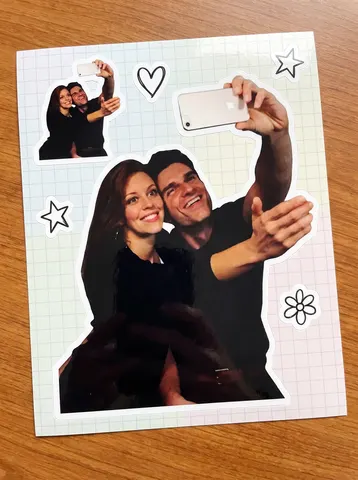
Turn this uploaded photo of a couple into a die-cut vinyl sticker sheet, the kind sold in a cute stationery shop. Cut the couple out from the photo and give them a thick white sticker border, like a glossy vinyl decal peeled straight off its backing. Duplicate the same cutout two or three times at different sizes across the frame, scattered like a real sticker sheet, along with two or three small matching doodle stickers around them — a heart, a star, a little flower — drawn in a simple hand-drawn line style.

Keep the couple's faces, expressions, outfits, and pose exactly as they are in the original photo — do not change their identity, proportions, or clothing. Set the whole sheet against a plain pastel or light grid background, like the backing paper a sticker sheet comes printed on.

Preserve the photographic quality and natural skin texture of the original photo inside each cutout — do not smooth skin, do not flatten it into flat cartoon shading, and do not distort faces or bodies. Keep the glossy sticker-vinyl look confined to the thin white die-cut border and a subtle shine, not the photo itself.

The final result should look like a real printed sticker sheet you'd peel apart and stick on a laptop or water bottle, made from your own photo.
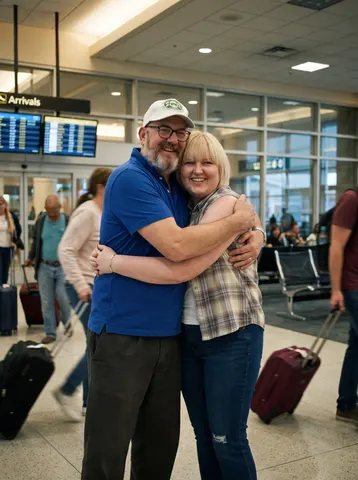
Transform this uploaded photo into a cinematic airport-reunion movie still. Reimagine the setting as an arrivals gate — warm terminal lighting, soft motion blur on travelers and rolling suitcases in the background, a sense of movement and emotion, like the exact frame after two people run into each other's arms.

Keep both people's faces, identities, and expressions exactly as they are in this uploaded photo — do not change who they are, their proportions, or their pose relative to each other. Preserve the emotional connection already in the original photo and let the new setting amplify it, not replace it.

Do not smooth or plastic-coat the skin, and do not lose pores, flyaway hairs, or fabric texture. Keep visible film grain and avoid warping hands, faces, or limbs. Lighting should feel warm and directional, like real terminal lighting bouncing off tile and glass, not an artificial studio glow.

The final result should look like a candid freeze-frame pulled from an emotional airport reunion scene in a romance film — real skin, real grain, genuinely moving, not overly polished or artificial.
Restyle this uploaded photo of two people as an early-2000s point-and-shoot digicam flash photo. Blast the subjects with harsh direct on-camera flash — blown-out highlights on skin, a slight flash halo, and the flat, slightly washed-out color palette of a cheap 3-megapixel camera sensor.

Keep the subjects' identities, poses, expressions, and the background setting exactly as they are in this uploaded photo — do not change who is in the frame, what they are wearing, or their arrangement. Preserve the composition, only restyle the lighting, color, and camera quality.

Add authentic digicam imperfections: mild noise and compression artifacts, slightly soft focus at the edges, a faint warm-yellow or cool-blue color cast typical of early digital sensors, and a subtle low-resolution feel. Do not smooth skin, do not add plastic or airbrushed retouching, and do not make the image look modern, sharp, or cinematic — it should look like it was pulled straight off a 2003 memory card.

The final result should look like a genuine early-2000s digicam flash photo of these two people, the kind you'd find scanned from an old CD-R of party pictures.
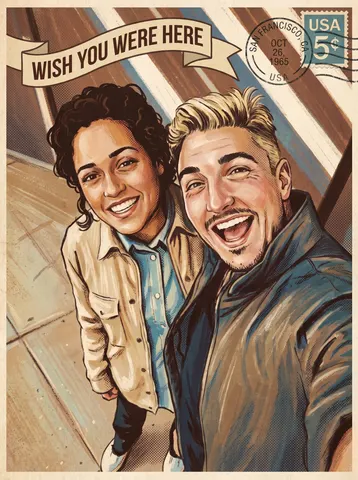
Transform this uploaded photo of the two of you into an illustrated vintage travel postcard. Restyle the scene with the warm, slightly faded color palette, soft halftone texture, and hand-painted illustration look of a mid-century tourism postcard, and add a curved 'Wish You Were Here' title across the top or bottom of the frame plus a small weathered postmark and stamp detail in one corner.

Preserve the exact identity of both people, their pose, expressions, and the framing and composition of the original photo — you are restyling the surface look, not the people. Keep the real location and setting recognizable rather than replacing it with a generic backdrop.

Keep the illustration credible: no melted or warped faces, no extra fingers or limbs, no garbled or duplicated text in the postcard title or postmark — a single clean line of lettering is enough. Retain a touch of visible brush or print texture rather than a flat, plastic, AI-smooth finish.

The final result should look like a real postcard you'd find in a vintage gift shop, made from your own memory instead of a stock illustration.
Transform this uploaded photo into a screenshot of a live video call, like a genuine freeze-frame from a FaceTime or video chat app. Keep the person's face, identity, expression, and pose exactly as they appear in the original photo — do not change who they are or how they're posed, only restage the presentation as an in-call screen capture.

Add authentic video-call interface elements around the edges of the frame: a small rounded self-view thumbnail tucked in one corner, a call duration timer ticking near the top, subtle signal and battery icons, and a soft rounded-corner vignette like a phone screen being photographed. Keep these UI elements small, legible, and placed at the edges so they don't cover the face.

Preserve the original lighting, background, and composition of the photo — only add the believable screen-capture framing and interface chrome on top, without smoothing skin, adding plastic texture, or losing the natural grain of the source photo. Avoid garbled or nonsense text in any interface label; keep on-screen text minimal and legible.

The final result should look like someone screenshotted a video call mid-conversation with someone they love, worth sending back to them.